Swarm Cluster on ARM SBCs 3
Stress Testing the Swarm Cluster
Now let’s look into deploying an app to do a stress test.
The first option is to use an old Rust bubble sort app I made a while ago.
However, it was compiled for x86, so it’s not compatible with the ARM architecture of the cluster.
We’ll need to rebuild it for ARM and test it.
Useful Resources
Choosing a Target Architecture
To see available Rust targets:
rustc --print target-list
Here are some relevant ARM targets:
armv7-linux-androideabi
armv7-sony-vita-newlibeabihf
armv7-unknown-freebsd
armv7-unknown-linux-gnueabi
armv7-unknown-linux-gnueabihf
armv7-unknown-linux-musleabi
armv7-unknown-linux-musleabihf
armv7-unknown-linux-ohos
armv7-unknown-linux-uclibceabi
armv7-unknown-linux-uclibceabihf
armv7-unknown-netbsd-eabihf
armv7-wrs-vxworks-eabihf
armv7a-kmc-solid_asp3-eabi
armv7a-kmc-solid_asp3-eabihf
armv7a-none-eabi
armv7a-none-eabihf
armv7k-apple-watchos
armv7r-none-eabi
armv7r-none-eabihf
armv7s-apple-ios
armv8r-none-eabihf
SBC Architecture Overview
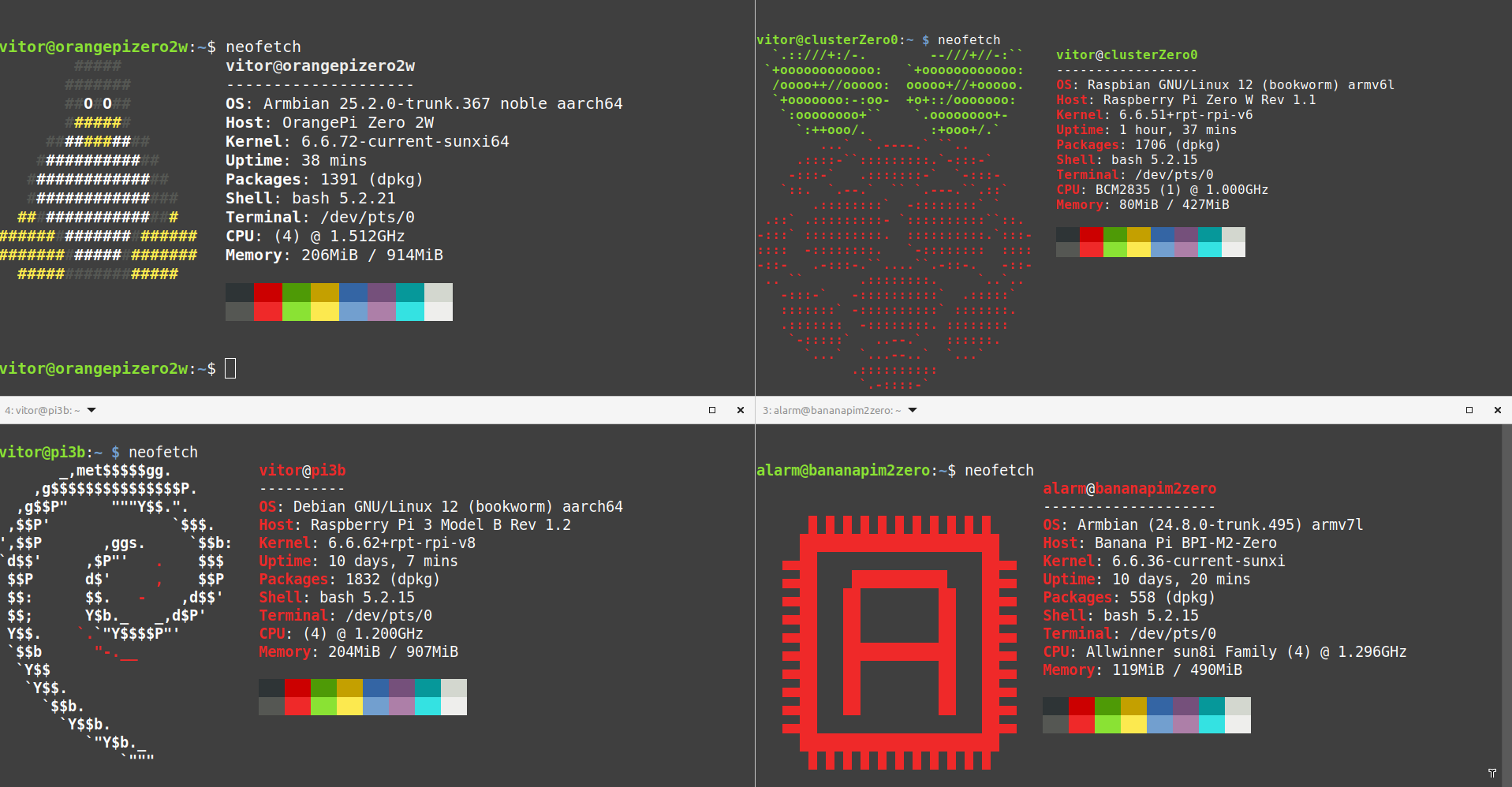
Using neofetch or fetch, here’s what we found:
- Banana Pi →
armv7l - Raspberry Pi Zero W →
ARMv6-compatible - Raspberry Pi 3B →
aarch64 - Orange Pi →
aarch64
Because the Pi Zero W uses an older ARMv6 architecture, we’ll try to compile for that and test for compatibility on the other devices.
Attempting Cross Compilation
Setup for armv7
Install necessary tools:
sudo apt install gcc-arm-linux-gnueabihf
rustup target add armv7-unknown-linux-gnueabi
Update your Cargo.toml:
[target.arm-unknown-linux-gnueabi]
linker = "arm-linux-gnueabi-gcc"
But… it didn’t work
Plan B: Build on the Target Device
If cross-compiling fails, install Rust directly on the SBC and build it locally.
Install Rust:
curl --proto '=https' --tlsv1.2 -sSf https://sh.rustup.rs | sh
Then clone your repo and build:
git clone <your-repo>
cd <your-repo>
cargo build
⚠️ This will take a while —
We’re working with just 1.2GHz CPU and 512MB RAM
Let`s take a look at the app code for reference:
use warp::Filter;
use serde::{Deserialize, Serialize};
use std::cmp::Ordering;
use log::info;

#[derive(Deserialize,Serialize,Debug)]
struct VetorStringRequest {
    strings: Vec<String>,
}


fn bubble(mut arr: Vec<String>) -> Vec<String> {
    let len = arr.len();
    for i in 0..len{
        for j in i..len - 1 - i {
            if arr[j].cmp(&arr[j + 1]) == Ordering::Greater{
                arr.swap(j,j + 1);
            }
        }
    }
    arr
}


#[tokio::main]
async fn main() {
    env_logger::builder().filter_level(log::LevelFilter::Info).init();
    let sorting_r = warp::path("Sort")
        .and(warp::post())
        .and(warp::body::json())
        .map(|req: VetorStringRequest| {
            info!("Request de lista recebida: {:?}", req.strings);
            let sorted_strings = bubble(req.strings);
            info!("Mandando resultado: {:?}", sorted_strings);
            warp::reply::json(&sorted_strings)
        });

    warp::serve(sorting_r).run(([127, 0, 0, 1], 3030)).await;
}
Using tokio as our web api, what it does is a simple bubble sort based on the input of a list of words and returns the sorted list.
And after 2 hours…. it compiled and its working

and now the results of sorting
Well after confirming that working the next step will be to create the required docker images to be used on the swarm
since the nodes kinda differ architectures, probably going to need to build images for each architecture….
well that it.